Building the Ultimate Enterprise AI Assistant: A Blueprint for Architecture, Tools, and Automated Coding
A practical breakdown of building an enterprise AI assistant: combining LLMs, RAG, agent tool loops, MCP integrations, and layered memory to create autonomous assistants that work directly inside apps like Slack.
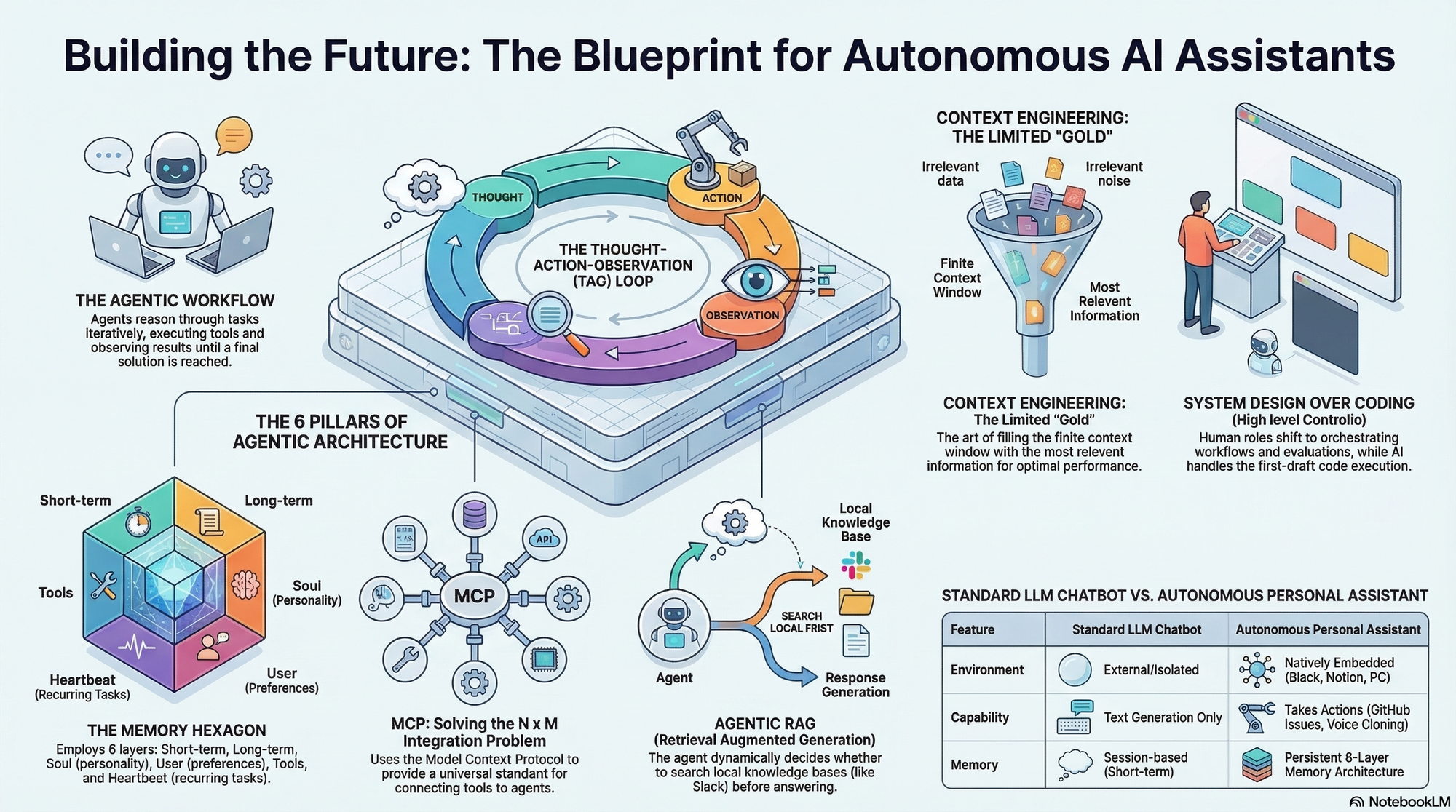
The recent release of the open-source "Moltbot" (originally Clawdbot, and later open claw) took the developer community by storm, amassing over 100,000 GitHub stars in just a few days,,. This massive popularity signals a paradigm shift in generative AI: we are moving past conversational chatbots that live in external web browsers, like ChatGPT, and entering the era of personalized, action-taking AI assistants that live natively inside our own applications, such as Slack,.
But how do you actually architect and build an enterprise-grade agent from scratch? Based on a comprehensive architectural breakdown, building a highly capable, autonomous assistant requires mastering six foundational pillars, designing a precise agentic workflow, and ultimately delegating the heavy coding to AI.
Part 1: The Six Pillars of Assistant Architecture
To build an assistant that truly acts on top of your databases and tools, you must engineer the following components:
1. Large Language Models (LLMs) At the foundation is the LLM, the reasoning engine trained to understand both the form and meaning of human language. While powerful, a pre-trained LLM alone lacks access to the external world.
2. Retrieval-Augmented Generation (RAG) To connect your assistant to your proprietary data (like your company's Slack channel history), you need a RAG system. A robust architecture utilizes "background indexing," which continuously chunks and embeds the latest data (e.g., the last 200 messages) into a vector database like ChromaDB every hour or two,,. When a user asks what was discussed about a specific topic, the system uses cosine similarity to retrieve only the most relevant context chunks to pass to the LLM,. When RAG is provided to the LLM as an optional tool it can choose to use, it is known as "Agentic RAG",.
3. Agents and Tools (The TAO Loop) To perform actions—like posting a Slack message or creating a GitHub issue—the LLM must be upgraded into an Agent,. This is done by giving the LLM access to "Tools" (API function calls) formatted in a specific, descriptive schema,. The agent operates on a Thought-Action-Observation (TAO) loop: it reasons about the user's request, selects a tool to execute an action, observes the result, and loops until the task is complete,.
4. Model Context Protocol (MCP) If you build custom API connections for every single tool across every single application, you run into an unsustainable "N x M" coding problem. MCP solves this. MCP is an open standard protocol that utilizes JSON RPC to connect your client application to external servers,. By spinning up an MCP server for applications like GitHub or Notion, the server automatically exposes its tools to your agent,. Your agent simply discovers and calls the tool (via tools/list and tools/call), eliminating the need to write endless custom integration code,.
5. Advanced Memory Architecture True personalization comes from a multi-layered memory system. An advanced assistant doesn't just remember the current conversation; it utilizes a robust, six-layer architecture:
- Conversational Memory for short-term context.
- Long-Term Memory (
memory.md) for decisions, user strengths, and commitments,. - Personality (
soul.md) to define the bot's tone and behavior. - User Preferences (
user.md) for personalized interaction, such as preferred names,. - Tool Configurations (
tools.md) to remember specific API setups,. - Periodic Tasks (
heartbeat.md) for scheduled, recurring cron jobs.
6. Context Engineering An LLM's context window is a highly limited resource. Context engineering is the delicate art of filling that window with the perfect balance of system prompts, conversational history, tool schemas, and RAG data. Give the model too little context and it fails; give it too much and it becomes inefficient and costly.
Part 2: Designing the Blueprint (The Workflow)
Once these pillars are established, you must design the step-by-step blueprint of how the assistant processes a query:
- Retrieve Memory: When a query arrives, the system first converts the prompt into a vector and searches its memory layer to pull in relevant facts from past interactions, including the bot's personality (
soul.md) or scheduled tasks (heartbeat.md),. - Determine RAG Utility: The agent evaluates if the prompt requires searching the external knowledge base. If it detects keywords like "retrieve" or "find messages," it pulls the most relevant context chunks from the background-indexed Slack history.
- Load Tools: The system loads all available native tools and MCP tools (like GitHub and Notion) into the prompt's context.
- LLM Tool Selection: The LLM receives this heavily engineered context and decides which specific tools it needs to fulfill the request.
- Execute & Respond: The chosen tools are executed, and their outputs are fed back into the LLM so it can generate its final response to the user.
- Update Memory: Finally, the agent autonomously extracts new facts, commitments, or scheduled tasks from the conversation and updates its long-term memory files for future interactions.
Part 3: Delegating the Coding to Claude Code
The paradigm of building software has fundamentally changed. As an industry leader, engineer, or system architect, your primary job is no longer to write raw code blocks from scratch,.
Today, you design the blueprint, establish security protocols (like running the bot locally on a Mac Mini or secure AWS server to protect private files), conduct ablation studies, and design rigorous evaluation frameworks,,,.
Once your detailed Product Requirements Document (PRD) is complete, you can outsource the initial coding phase to an AI model. By using Claude Code paired with the Opus 4.5 model, you effectively hire a highly capable junior software developer.
- Open the Claude Code terminal extension inside your IDE.
- Feed Claude Code your massive, highly detailed text prompt containing your desired features, architecture, RAG settings, tool strategies, and memory layers,.
- Instruct the AI to "thoughtfully create and construct this entire project" and build it systematically,.
Claude Code will autonomously generate the foundational codebase, file structures, and routing in under an hour,,. By mastering system design and leveraging open protocols alongside automated AI coding, building a fully autonomous, hyper-personalized enterprise assistant is no longer a multi-month engineering nightmare—it is the new standard workflow.
example github rep0 built for slack - https://github.com/apoorvakumar690/contextual-slack-bot